Run Android applications on Windows 10 via the Your Phone Windows 10 application
The availability of Android apps on Windows 10 for newer versions has noticeably increased in recent weeks. Not to mention wider availability, which is just as important for seamless functionality as it is in phones.
Of course, we are talking about a new and improved version of an application Your Phone For Windows 10. Which has just been finalized, although some users in some countries will still have to wait until Friday to get it.
In order to take advantage of Android app mirroring capabilities on Windows 10, you’ll need a PC running at least the October 2018 OS Update version 1.20071.88.
Other technical requirements include running the latest version of the Your Phone Windows 10 app, build number 1.20071.88, as well as a device running Android 9 Pie and later versions of the Android operating system.
Finally, you will need to download and install the Your Phone Companion application, which you can download from the Google Play Store – for free, of course (application link Link to Windows Android app If you have installed it before and are having problems running it or prompting an update, you must perform the update or reinstall process again and the problem will be solved.
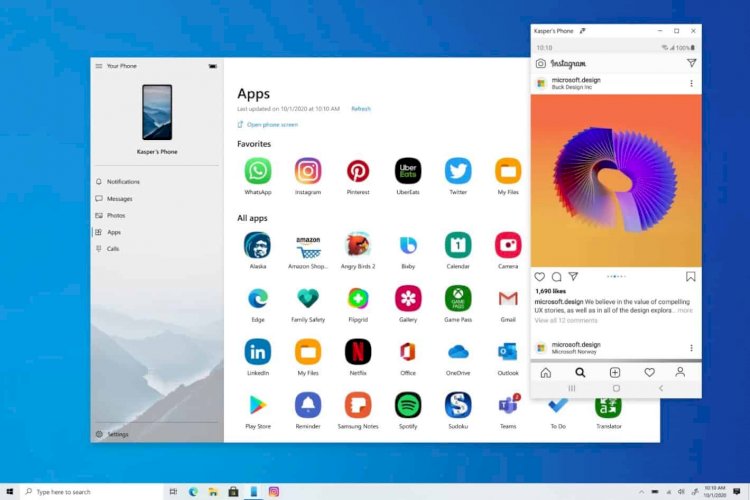
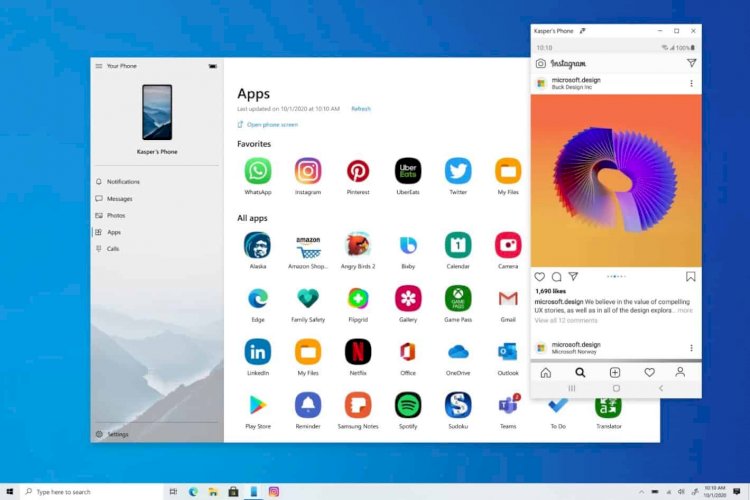
It lets you pin your favorite Android apps to the taskbar or Start menu on your Windows 10 PC for quick and easy access.
The apps will open in separate windows from the Your Phone app, allowing you to use them essentially the same way you would on your phone.
With many people still working from home due to the coronavirus pandemic, the ability to access phone apps on a larger desktop or laptop screen, using a mouse, pen, or touchscreen, can help with multitasking.
To see the complete steps to run Android applications on Windows 10 >> Follow the following explanation