Google views interface design for AI assistants as an uncharted field, likening this stage to what the original Macintosh computer faced in 1984 when it introduced its first graphical interface.
Then, designer Susan Kerr succeeded in simplifying complex digital concepts through easy-to-understand visual symbols, such as a trash can and drawing tools, to serve as a link between the user and machine logic.
Today, Google sees Gemini facing a similar challenge of improving accessibility, enhancing visual clarity, and reducing user concerns, especially with the changing nature of artificial intelligence and the conceptual gaps associated with it.
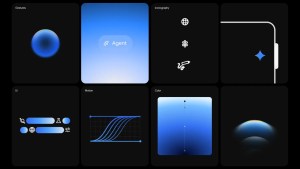
Therefore, the company chose to rely on color gradients as the main visual element that seamlessly guides users towards a clearer and more flexible collaborative experience.

In Gemini, gradients are used to convey a sense of energy and directional movement, visually leading the eye towards the most important elements. They also help give the system a “living” feel by embodying the process of thought and analysis, making the smart assistant more approachable and understandable to the user.
This design philosophy is clearly evident in Gemini Live, the Android overlay interface, and the main icon. Google also explored alternative designs for interactive gestures, such as activation graphics via the play button or swiping from the edges of the screen.
Google also focused on the circular shape as a basic element, because of its connotations of simplicity, harmony, and comfort, which is also reflected in the design of the Gemini logo, which relies on negative spaces between circles.
In addition, movement was considered an essential element of the design, as it gives the user a sense of interaction and response, and shows the flow of information and the formation of ideas in a clear visual way.
Finally, Google aimed to provide a soft and smooth experience that makes Gemini more accessible and approachable to the user, with a focus on building trust and enhancing a sense of security, so that the smart assistant becomes intuitive, immersive, and reliable at the same time.