Documents, data, photos, videos, music, contacts, important messages, emails, and sometimes work documents are usually stored in iPhones. This is why it is important to always make a backup, and not just wait in case a disaster occurs and your phone stops working. What will happen if you forget to make a backup copy, or if the backup copy is damaged?
Is it still possible to recover some or all of this data from the device? The answer will probably be yes. Many companies offer data recovery programs that can save you time, and here you will need to use third-party programs and applications, so we will help you today by providing some solutions in case you have lost your data and can no longer access it from your iPhone or iPad.
But we will discuss the ways to recover lost data; In this article, we have compiled the best data recovery software for iOS devices, and to help you find the right solution for you.
General buying tips
Please note that none of these applications are 100% guaranteed to recover a specific file or indeed any data at all because data recovery is a very complex and not very reliable business. Therefore, we always recommend preparing multiple backups. But if you do not have any prior backup, this may be your last resort to save your files or data again.
General buying advice
As you can see, data recovery software tends to be very expensive, because the people who need it often need it the most. However, before you spend a lot of money, you can take a look to see if there is a free trial available and give it a try.
Unfortunately, this online world contains a high rate of scams, which is why we have listed only three products below.
Best data recovery apps
The best 3 programs to recover deleted data for iPhone
1 – Dr. Fone

Price: $69.95
Install Dr. Fone on your Mac or PC, connect your iPhone via Lightning cable, and you’re ready to start searching for deleted or inaccessible files.
The program can recover files directly from an iOS device, but is also capable of scanning iCloud or iTunes backups. It can find photos, messages, calendar items, reminders, call history, bookmarks, voicemail, notes, WhatsApp attachments, and more.
We tested version 9.2.1 – the program is easy to use. You simply select the Recover module, choose the file types you want to search for, and start scanning. We found that it took about five to ten minutes even when searching for a small subset of files, so don’t expect immediate results.
Note that although there is a trial version, it is not very useful: you will be able to search for (and find) files but recovering them requires the full paid version. However, you will at least know what the program will be able to recover before paying any money.
The full version costs $69.95, assuming you only want a refund.
Download and visit the official website
2- EaseUS MobiSaver
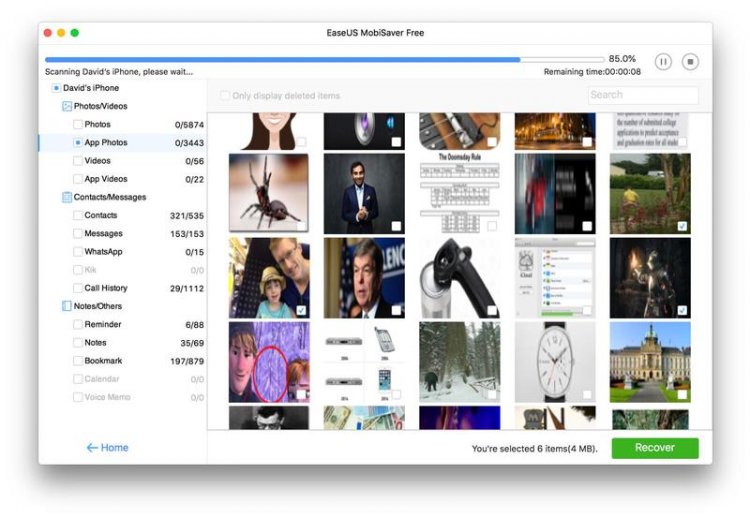
Price: Free version and paid version costs $59.95
Like Dr. Fone, EaseUS can recover (or attempt to recover) files from your device, or from iCloud or iTunes backups. There are separate versions for MacOS and Windows.
We couldn’t get EaseUS to scan the iPhone at all, as the program constantly gives a stop-connection using the Lightning cable; We haven’t had this issue with the same cable on other apps and it seems to be unusually sensitive in this regard.
You may have more time before purchasing this program to test it if it works on your phone.
However, when scanning old iTunes backups through this software, we got many photos and messages that were deleted long ago and were forgotten.
The scanning and screening process takes some time. We recommend having a cup of tea while you wait.
The thing we like most about EaseUS is that the free version is actually useful in a simple way. Most free versions of data recovery apps will only scan and demand payment before recovering anything; But this program will recover one photo and up to five contact. This is not a lot, but we can imagine situations where it would be useful.
The full version (Pro) costs $59.95, and this unlocks the full recovery features.
Download and visit the official website
3- Stellar Data Recovery for iPhone
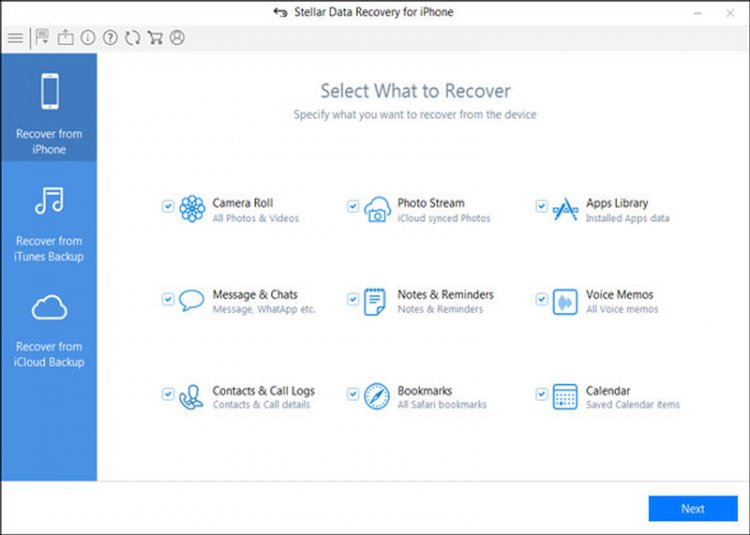
Price: $47.99
The third option is Stellar Data Recovery, which aims to recover all your lost data from iPhone or iPad. It can also recover some data from iTunes and iCloud backup.
You will find that it can rescue photos, videos, contacts, call history, messages, voice memos, and bookmarks from your own device, and you can also recover deleted data from WhatsApp, WeChat, Viber, and other apps. As with EaseUS, there are also versions of Stellar for macOS and Windows.
We had connectivity issues with Stellar as we did with EaseUS, but thanks to the free version, you’ll be able to determine if this will work with your device before paying any money.
The free version will let you scan your device and preview the files it can recover, so you know if it’s worth paying the money.
Stellar Data Recovery costs approximately $47.99, and is available to try or purchase on the Stellar website.