Allows you to applyMi Control Center Get the iOS design in the Quick Settings panel on Android There is no doubt that the Android system is more functional than the iOS system when it comes to notifications as well as customization, however, we all have to admit that there is great elegance in the Apple system’s notification panel and its control center in its devices.
Therefore, some users may prefer the transparent design, separate notifications, and quick switching pages. If you are one of these, or are interested in trying the iOS design on an Android device, the new Mi Control Center application may deserve to be one of our topics today.
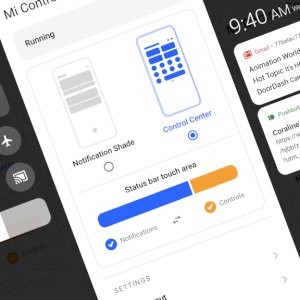
can be defined Mi Control Center It’s an app that gives your notifications and quick settings panel an iOS/MIUI-style makeover, including some nifty animations that make swiping down and accessing it all that much more fun. With this app get the iOS design in the quick settings panel on Android and what the Mi Control Center app is capable of >
For example, separating the Notification Center and Quick Settings into two panels that can be pulled up by swiping on different halves of the screen, or the process can be customized to show the quick toggle at the top of the Notification Center just like in stock Android. There are a lot of customizations you can make, such as setting an image as the background for the two panels or changing the look of the Quick Settings settings.
With this app, get the iOS design in the Quick Settings panel on Android. Finally, Android and iOS have never been closer in terms of features and aesthetics, which will help the Mi Control Center app, at least, by making the gap smaller. In conclusion, the app is available for free download on the Google Play Store, with some advanced features that need to be purchased.
Download the Mi Control Center application from the Google Play Store.