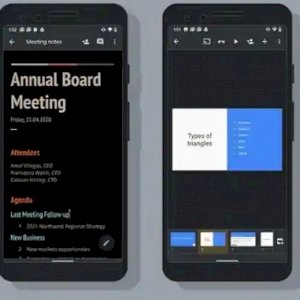
Google’s Docs, Sheets, and Slides apps now offer a dark mode Google has been slowly rolling out dark modes across all of its apps — including Gmail, Calendar, Fit, and the Google app — since last year and Android is also introducing a system-wide dark theme. Anyway,
Here’s how to turn on dark mode in documents, spreadsheets, and presentations.
How to get dark mode for Google Docs, Sheets, and Slides
Turning on Dark Mode is only available for the “Docs”, “Sheets” and “Slides” mobile apps. You can manually turn on Dark Mode from Settings by installing or updating to the latest version of the Google Docs, Sheets or Slides app on your Android device.
Once the new update arrives, these applications will use the default theme of your operating system. If the mode is dark on your phone as a whole, these applications will be dark and vice versa as well..
Google also said that you can manually switch between the new dark mode and the old light mode under Settings in Google Docs, Sheets, and Slides. All you have to do is follow the following steps.
- Open the application
- Move to the menu in the corner Menu
- Then select settings Settings
- And move on to choosing the theme Theme
- And click in the dark. Dark
Users with older Android phones will likely have to turn on dark mode manually, as they cannot enable dark mode system-wide.