Google Photos is one of the best places to back up your photos and keep them safe, whether you’re using an Android phone or tablet, an iPhone, iPad, Mac or Windows PC, there’s a free app available that will automatically back up all your photos and videos.
If you choose the “High Quality” image upload size, you’ll have unlimited storage for backups, but Google will automatically compress any images larger than 16 megapixels. If you choose “Original,” images will be uploaded without any compression, but you’ll be limited to your Google account’s storage quota, i.e. 15GB for free accounts, although you can purchase more space if you want.
-
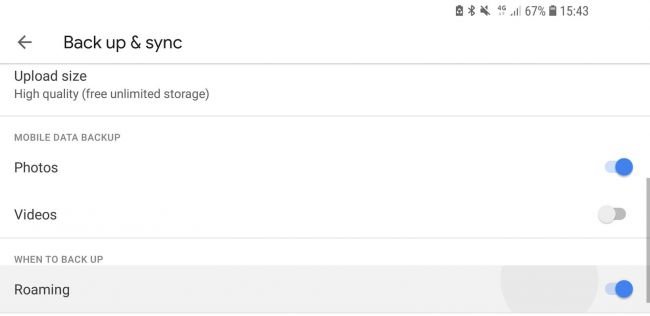
Back up photos to Google from your phone or tablet
- You can download the Google Photos application for the operating system iOS or Android.
- Open the application and click on the menu button.
- Select Settings, then tap Backup & Sync.
- Run the backup process.
-
Back up to Google Photos from a PC or Mac
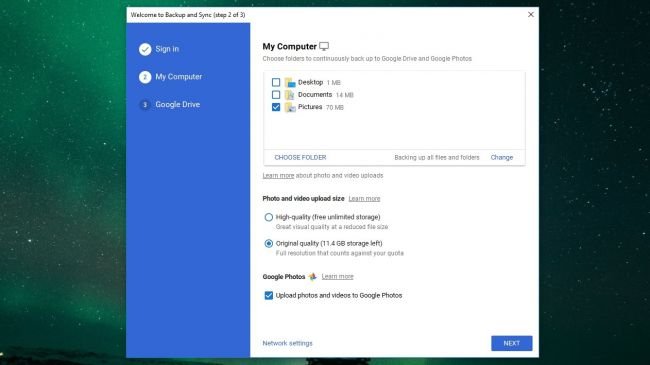
- Download and install Google Backup and Sync.
- Sign in using your Google account.
- Select your pictures folder.
- Choose to upload photos in high or original quality.
- Select “Upload photos and videos to Google Photos.”
- Choose whether you want to sync files to Google Drive.
- Click OK to start the backup.