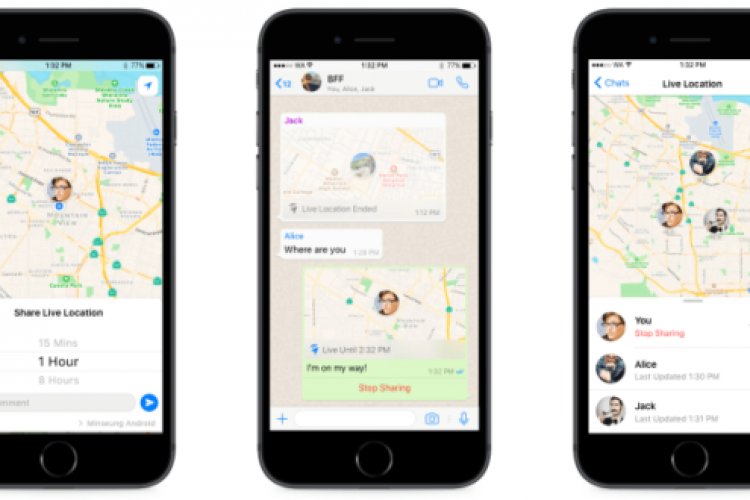
Whatsapp offers a feature that allows you to share your real-time live location with family or friends. Whether you’re meeting up with friends, letting loved ones know you’re safe, or sharing your commute, Live Location is a simple, secure way to let people know where you are.
This end-to-end encrypted feature lets you control who you share with and for how long.
You can choose to stop sharing at any time or set a timer for the live location feature so that it simply ends after the specified time is up.
Here’s how to share your live location on WhatsApp
1- Open a conversation with the person or group you want to participate with.
2- Go to the “Location” option and you will find it inside the attach button 
3- Choose the duration you want to share and click Send.
Every person in the chat to whom you sent your current location data will be able to see your exact location in real or instantaneous time on the map.
Stop sharing your live location
Stop sharing your live location in an individual or group chat
- Open individual or group chat.
- Click on Stop sharing > Off.
Stop sharing the live location in all individual and group chats
- Click on the icon Additional options

- Click on Stop sharing > Off.

If you share your live location with more than one person, for example through a group, your live location will also appear to all people within this group and on the same map.
- You can disable the permission to share location on WhatsApp at any time you want through… Settings On your phone> Apps and notifications > Advanced settings > App permissions > the site > Then disable the Share Location button on WhatsApp.
- You can disable the permission in another way if you have recently opened WhatsApp by going to Settings On your phone> Apps and notifications > WhatsApp > Permissions And then disable it the site.
Live Location is available on both Android and iPhone devices. We hope you like it.
If you liked this article, please share it with others to benefit, and to receive technical news, reviews, and video lessons. You can also find us on Twitter, Instagram and Facebook.