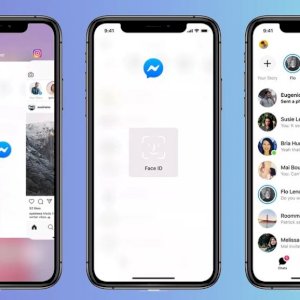

How to lock your conversations on Facebook Messenger using Face ID or Touch ID
Do you want to be sure that no one will have further access to your conversations by using the Facebook Messenger application when you are away from your iPhone or iPad? Well, Facebook now lets you enable an additional ring of security through which you can lock the app itself when you close it, which will result in the app asking you to use Face ID or Touch ID to unlock it the next time you exit.
Here’s everything you need to know about the new privacy feature in the Messenger app, and how to enable it on your device.
Have you ever been in a situation where you unlocked your phone and let a friend or family member borrow it, and immediately regretted that decision, fearing that that person would have access to your private conversations on Messenger? This is now an issue that has become a thing of the past after Facebook’s new update.
Facebook introduced a new feature, technically called App Lock, for iPhone and iPad users to close the Messenger app with their fingerprint or eye after exiting the app. But keep in mind that you must set up a face ID or fingerprint and passcode on your phone before you activate it. Once you set up the authentication method on your phone, you can enable it and activate it immediately for use in the Facebook Messenger app.
How to lock the Facebook Messenger application on your device with your fingerprint or face
Follow these steps:
- Update the Messenger application from the Store first
- Open the Facebook Messenger application
- Click on your profile picture at the top left.
- Click Privacy > App Lock.
- Tap Require Face ID or Require Touch ID to turn on and off.
- Set a time to lock the app after leaving it.
When you want to answer messages or calls from the Messenger app, tap on the notification, after which the app lock will ask for your fingerprint or Face ID. You can still see message and call notifications from Messenger when your phone is locked, although you can turn off previews of messages coming from the Messenger app. You can also set up your device to let you respond to locked notifications without providing an ID.
Note that this feature is not currently available for Android phones. Will the App Lock feature come to Facebook Messenger on Android?
The answer is that App Lock is supposed to come to Android in the “next few months” – allowing Android phone users to also lock their Messenger conversations.