Are you tired of WhatsApp? Here is how to delete a WhatsApp account permanently,
If you are trying to reduce the number of intrusions in your daily life, getting rid of various social media and communication applications is a good thing. We have explained how to delete accounts. Facebook and Twitter and Snapchat But if that’s not enough for you, here’s how to permanently delete your WhatsApp account as well.
Before you begin, we warn that this process is irreversible. Once you delete your WhatsApp account, it will be deleted forever, along with any backup copies, and all your messages will be removed from WhatsApp’s servers and cannot be returned to if you change your mind.
So, if you have important information on your account, be sure to write it down, take screenshots, or use your preferred backup method to preserve the data you have.
Keep in mind that if you’re tired of WhatsApp, you can simply delete the app instead of deleting the account. To do this, first run a backup on WhatsApp before removing the app itself, and if you want to back it up later, you can download it again and get your updates, photos and all your information back from the backup and all the data intact (as long as you’re still on the same mobile platform, as iOS and Android can’t).
See our How to Backup and Restore WhatsApp guide for instructions on how to do it quickly and easily.
-
Delete your WhatsApp account from Android phones
To delete your account, open the WhatsApp application and click on the menu in the upper right corner of the screen and from the menu that appears to you, choose Settings > Account > Delete my account to permanently separate your relationships with WhatsApp. See the image below.
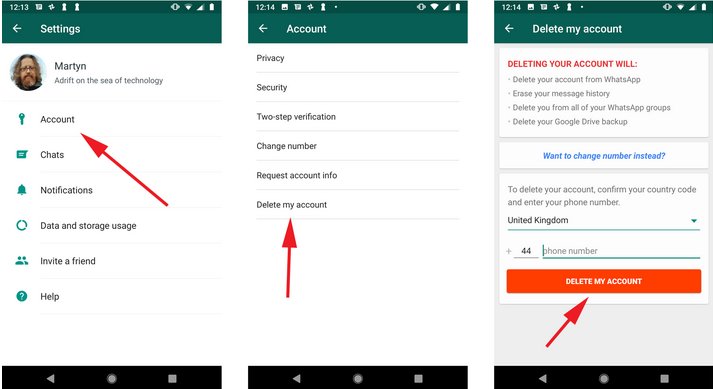
You will then be asked to enter your phone, enter the phone number and press Delete my account.
-
Delete WhatsApp account from iPhone
The steps to delete your account on iPhone are the same and very similar to the steps for deletion on Android phones.
Open the WhatsApp application, then click on Settings > Account > Delete my account.
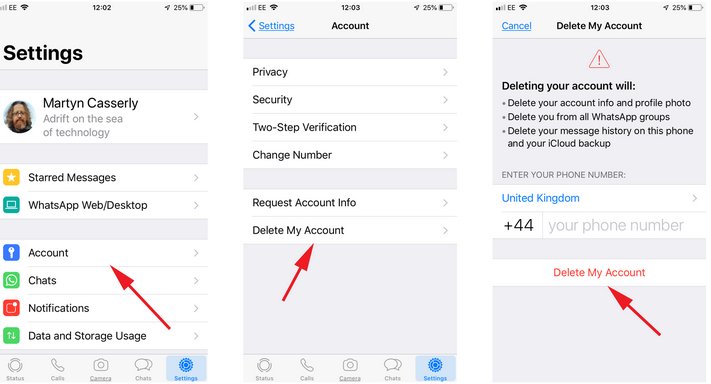
You will now see a page warning you of what will happen if you continue this process. Enter your mobile phone number and click on the Delete my account option at the bottom to permanently separate your relationships with WhatsApp.