After three months of beta testing, Apple officially released iOS 14 to the public yesterday, September 15, and the update includes a variety of new features, including widgets on the home screen, a completely new application library, and much more. Read on as we round up the 14 best features in iOS 14 this year.
Does my iPhone support iOS 14 features?
First of all, here are the details that iOS 14 supports, which are the following models, according to Apple’s website
- iPhone 11
- iPhone 11 Pro
- iPhone 11 Pro Max
- iPhoneS
- iPhoneS Max
- iPhoneR
- iPhone
- iPhone 8
- iPhone 8 Plus
- iPhone 7
- iPhone 7 Plus
- iPhone 6s
- iPhone 6s Plus
- iPhone SE (1st generation)
- iPhone SE (2nd generation)
- iPod touch (7th generation)
We come to Features in iOS 14
1- Home screen tools
iOS 14 is the first version of iOS that supports adding widgets directly to your home screen. This means that the iconic grid of icons can officially be swapped out to include widgets for first-party apps from Apple and third-party developers. We’ll show you how to use home screen widgets for iPhone and iPad.
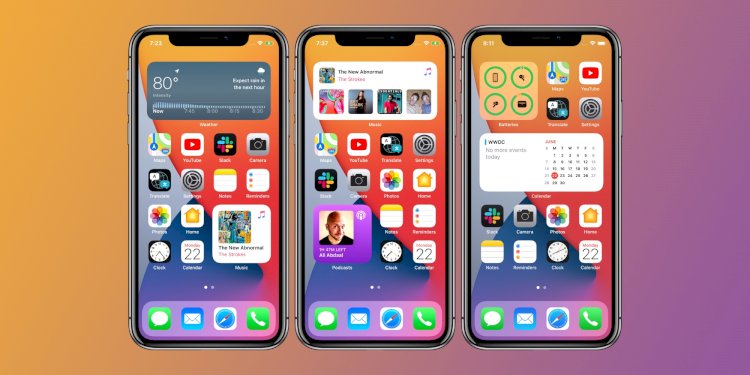
You can add Weather, Clock, Smart Stack from multiple widgets to your home screen, and iOS 14 will use on-device intelligence to show you the right widget based on time, location, and activity. and
iOS 14’s built-in widgets include:
- Batteries
- Calendar
- Wall clock
- Files
- Fitness
- maps
- music
- news
- comments
- the pictures
- Podcasts
- reminder
- Screen time
- Abbreviations
- Siri Suggestions
- television
- advice
- weather
2- Application library
In conjunction with the new home screen widgets, iOS 14 also includes a brand new app library. Apple describes App Library as a new Home screen that “organizes all of a user’s apps into one simple, easy-to-navigate view, intelligently popping up apps that are useful at the moment.”
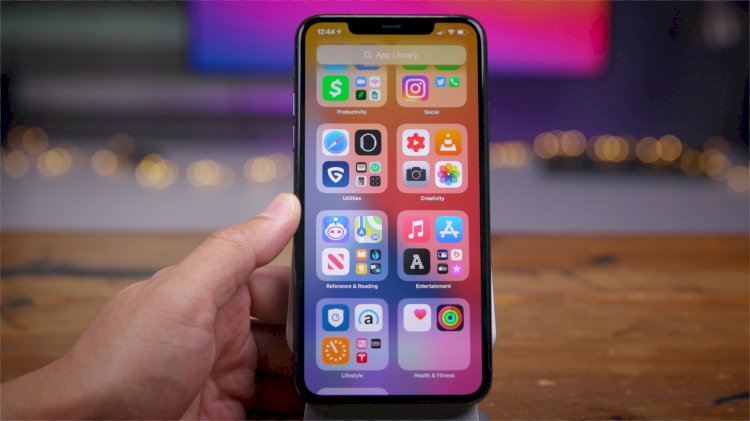
This basically means that you no longer have to keep all your apps on your iPhone’s home screen. Instead, you can delete apps from your home screen but keep them in the App Library for when you need to access them. You can also hide Home Screen pages in iOS 14.
3- Pictures in pictures
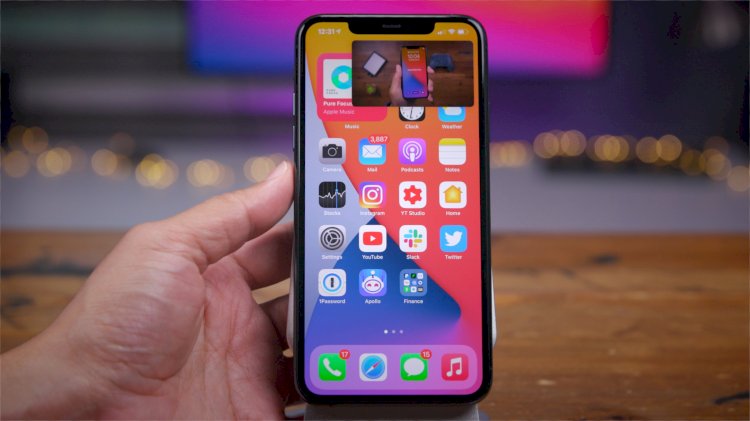
One of the best features of iPadOS is finally making its way to the iPhone this year thanks to iOS 14: picture-in-picture video support. This means you can watch video from a variety of apps on your iPhone while you’re on the go in iOS 14. Picture-in-Picture support also extends to FaceTime calls, so you can stay in a FaceTime call while using other apps and the video will simply move to the corner of your iPhone.
4- YouTube 4K support
Thanks to iOS 14 improvements, the YouTube app now supports 4K playback for the first time. To access this feature, open the YouTube app on your iPhone, start playing a video, choose the “More” icon in the top-right corner, tap “Quality,” and choose 2160p.
5- Built-in Siri and phone interfaces
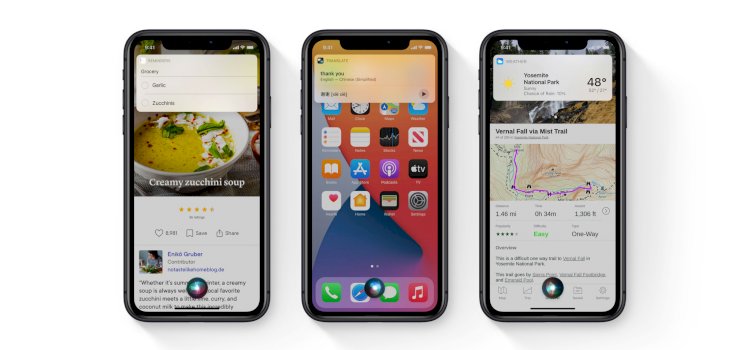
With iOS 14, incoming phone calls will no longer take up your entire iPhone screen. Instead, a small incoming call bar will appear at the top of iOS, allowing you to easily accept or reject the call without missing anything else. It’s a simple change, but it’s been on many iOS users’ wish lists for years.
Siri also got a complete redesign in iOS 14. This means that activating Siri no longer bypasses the entire iPhone screen. Instead, a small Siri interface will appear along the bottom of your device’s screen.
6- Change the default browser and email applications
Although Apple does not favor it much, iOS 14 also provides support for changing the default email and browser applications. This means that you can Set a third-party app like Google Chrome as your default web browser Your, and all links will open in Chrome by default.
You can also set third-party email apps like Gmail as your default email client, and all mail:and links will automatically open in that app instead of Apple’s Mail app.
We also note that these features require adoption by third-party applications, so not all email and browser applications will be supported from day one.
7- App Clips
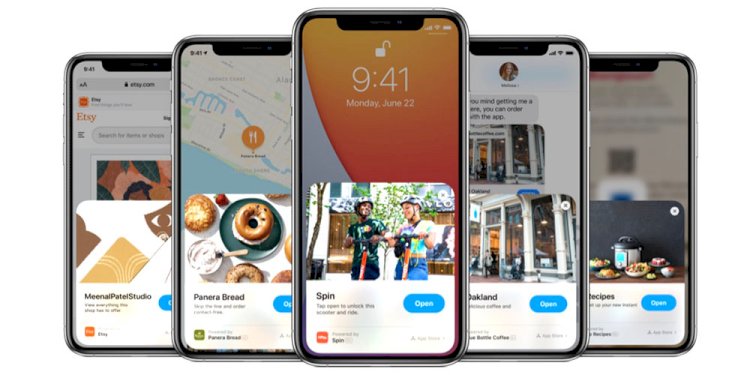
One of the biggest features in iOS 14 is something Apple calls App Clips. Essentially, Apple bills this as a way to download parts of an app at the time they need it, without downloading the full app.
App Clips are a great way for users to quickly access and experience what your app has to offer. An App Clip is a small part of your app that can be discovered the moment it’s necessary. App Clips are fast and lightweight so the user can open them quickly. Whether they’re ordering takeout from a restaurant, renting a scooter, or setting up a new connected device for the first time, users will be able to start and end an experience from your app in seconds. And when you’re done, you can have the opportunity to download your full app from the App Store.
For example, a parking app like ParkWhiz can quickly find and pay for parking without downloading an entire app from the App Store. App Clips can streamline your operations without downloading the app. Apple says App Clips can be discovered and accessed by scanning a new Apple-designed App Clip icon, through NFC tags and QR codes, or shared in Messages or from the Safari browser.
Again, third-party apps will have to adopt App Clips, so it may take some time until you see use cases for App Clips spread to the iPhone.
8- Accessibility features
Apple notes that iOS 14 also includes a variety of accessibility improvements, including the popular Back Tap feature that lets users launch gestures, shortcuts, and accessibility controls by tapping on the back of the iPhone, Back Tap, which provides a new, quick way to launch gestures, tasks, shortcuts, and accessibility, sign language detection in Group FaceTime, and Voice Recognition, which uses on-device intelligence to notify users when it detects the sound of a fire alarm or doorbell.
VoiceOver, the industry’s leading screen reader for the blind community, now automatically recognizes what’s visually displayed on screen so more apps and web experiences are accessible to more people.
9- Search for emojis
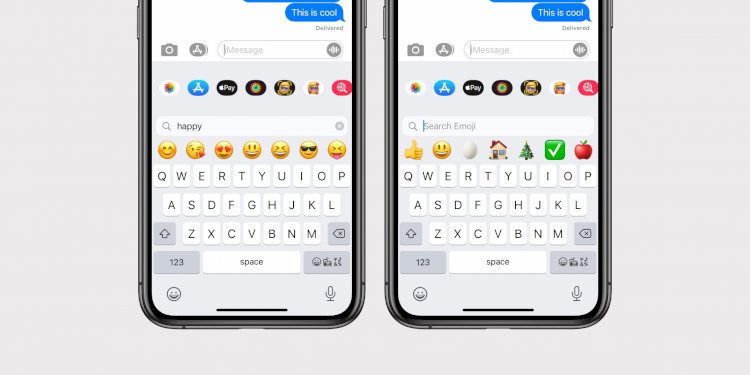
Another simple but long-awaited feature made its way to iOS 14 this year: support for searching an incredibly large collection of emoji. To find the exact emoji you’re looking for, simply open the emoji picker from your iOS keyboard and you’ll see a brand new search field.
10- Maps application updates
iOS 14 also brings new features to the Maps app. Apple says Maps now makes it easier than ever to “navigate and explore with new cycling directions, electric vehicle routing, and curated guides.”
Apple explains that the update includes map directions such as how crowded a street is, directs the electric car to charging stops along the planned route based on the types of car and charger charging, and the guides provide a curated list of interesting places you can visit in a specific city, created by a selection of trusted resources.
11- New messaging application features
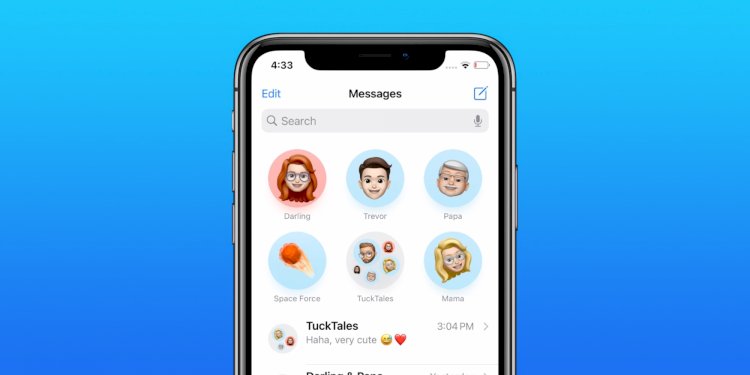
How to pin text messages on iPhone The Messages app is undergoing a major overhaul with iOS 14. One of the biggest changes in Messages is the ability to pin threads and conversations to the top of the message list like WhatsApp. This includes individual conversations as well as groups for quick access. Other improvements to the Messages app in iOS 14: @mentions in group chats, setting a group photo, new Memoji options, and threaded replies.
12- Privacy
Privacy is a pillar of support for iOS 14 as it is with every recent iOS update. Here are the most important new privacy features of iOS 14:
- Users can choose to share their approximate location with app developers instead of sharing their exact location when granting app location access
- Developers can now offer users the option to upgrade their existing accounts to Sign in with Apple
- New status bar indicator when the app is using the microphone and camera
- Later this year, App Store product pages will feature summaries of developers’ self-reported privacy practices, displayed in a simple, easy-to-read format.
- Starting early next year, all apps will be required to obtain user permission before tracking
13- New AirPods features
iOS 14 also enables two new features for AirPods users: spatial audio and automatic device switching.
The Spatial Audio feature is exclusive to the AirPods Pro, and toggling is accessible via the Control Center when the AirPods Pro are connected. Apple says Spatial Audio is an immersive experience using directional audio filters to “play sounds almost anywhere in space, creating an immersive audio experience.” This will place the surround channels in exactly the right place, even while you turn your head or move your device.
Meanwhile, automatic device switching will allow your AirPods or AirPods to switch between iPhone, iPad, iPod touch, Mac, and Apple Watch paired with the same iCloud account.
14- Translation application
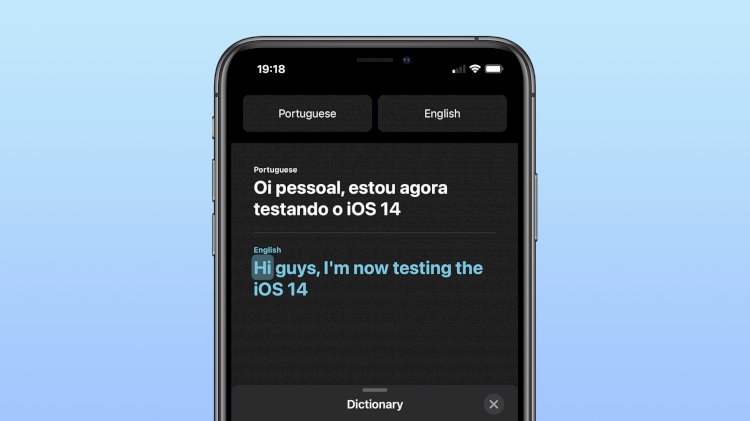
Finally, iOS 14 introduces an all-new built-in app called Translate. Apple says Translate is designed for conversations across 11 different languages with features including conversation mode and offline mode Designed to be the best and easiest app for translating conversations, Translate offers fast, natural translation of voice and text among 11 different languages. On-device mode allows users to experience the app’s features offline for private voice and text translation
iOS 14 wrap up
iOS 14 is a major update for the iPhone, and the features described here are just the beginning. Be sure to check out the hands-on video with iOS 14 features below as well.