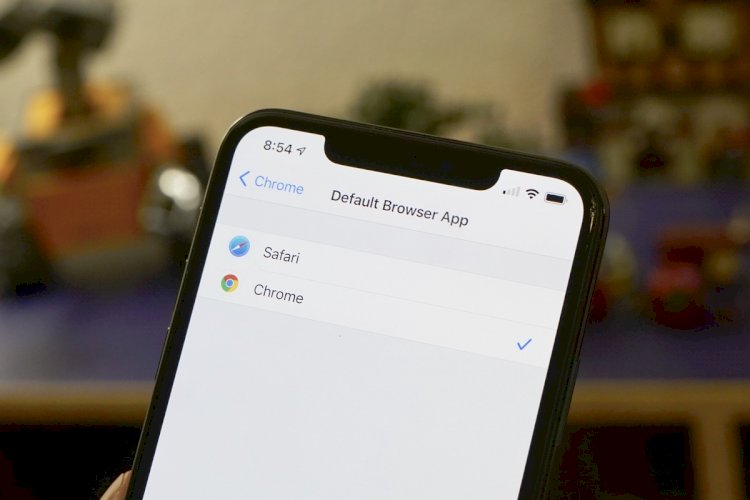
The primary browser for iPhone phones is Safari, as most users browse the web using Apple’s pre-set Safari browser by default, which is a fast, secure, and energy-saving browser. Apple is making every effort to enhance privacy protection features, but in Apple’s new update to its iOS 14 system, the system now supports third-party browsers.
Some people prefer Google’s Chrome browser. There are millions of iPhone and iPad users who prefer to use Google Chrome, whether it’s because of Google’s integration with its other services or to sync more easily with Chrome for desktop devices.
While using Chrome on an iPhone or iPad is easy enough, there was no way to make it the default browser. If you clicked a web link in another app like Mail or Messages, it would open in Safari.
But with iOS 14, Apple is finally adding the ability for web browsers to set itself as the default, and Google Chrome is one of the first to offer this option.
At the time of writing, iOS 14 and iPadOS 14 have not yet been released, but they are in public beta and will likely arrive today gradually for most users. If you have got the beta (or are reading this after the official release of iOS 14), here is what you need to do to make Chrome your default browser.
How to make Google Chrome the default browser for iPhone

To set Chrome as your default web browser follow these steps
– Make sure your phone is running iOS 14 (beta or final) and update Google Chrome.
– Open the “Settings” application on your iPhone or iPad.
– Scroll down and click on Chrome.
– Click on the default browser application.
– Select Chrome.
Now Chrome is your default browser
To return to using Safari as your default browser, either uninstall Chrome or go back to the Settings menu at the top and select Safari instead of Chrome.