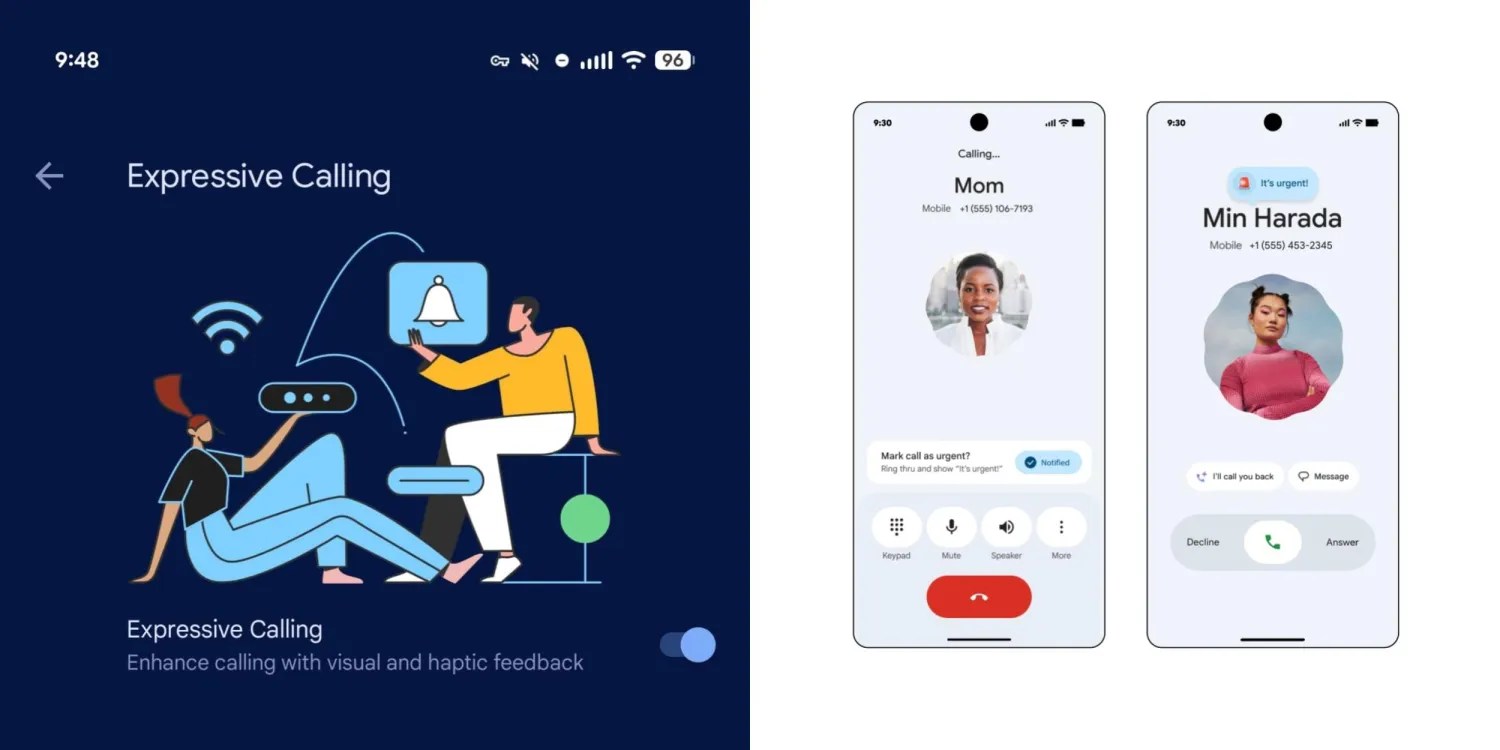
After announcing it at the beginning of this month, Google has actually started rolling out the new Expressive Calling feature within the Phone by Google app to beta users.
To check if the feature is available on your phone, go to the Settings app, then General, then Expressive Calling near the bottom of the list.
The basic option is enabled by default, which aims to enhance the call experience through visual and tactile effects. The option to allow urgent calls to hijack Do Not Disturb (DND) mode remains up to the user’s choice.

Currently, the feature requires both parties to the call to be using the beta version of the Phone by Google app, specifically version 203. When this condition is met, during the call a new card appears at the top of the controls asking if you want to mark the call as urgent, with the ability to press the notification button.
On the other end, the person called receives a clear on-screen alert that says “It’s urgent!” Accompanied by an animated siren emoji. If the call is not answered, an “urgent” mark is added to the call log to distinguish it from others.
In a related context, version 202 of the Phone by Google application has reached the stable channel, but the shorter bottom navigation bar and the “keep portrait mode” option have not yet spread widely. These improvements are currently still exclusive to the beta version, with hopes of rolling them out soon via a server-side update.